

Comparison
Loftie Clock vs Hatch Restore 3
Sunrise, Offline Use and Subscriptions
Compare the Loftie Clock and Hatch Restore 3 for sunrise light, offline use, bedside controls, included sounds, subscriptions and power cuts before you choose.
By thisHUSH EditorialUpdated November 3, 20268 min read2 picks
Our recommendation: Loftie Clock
Best for offline bedside use
Limit: No sunrise light: pair it with a wake-up light if you want one
On this page · Our picks at a glance
Our picks at a glance
- 1
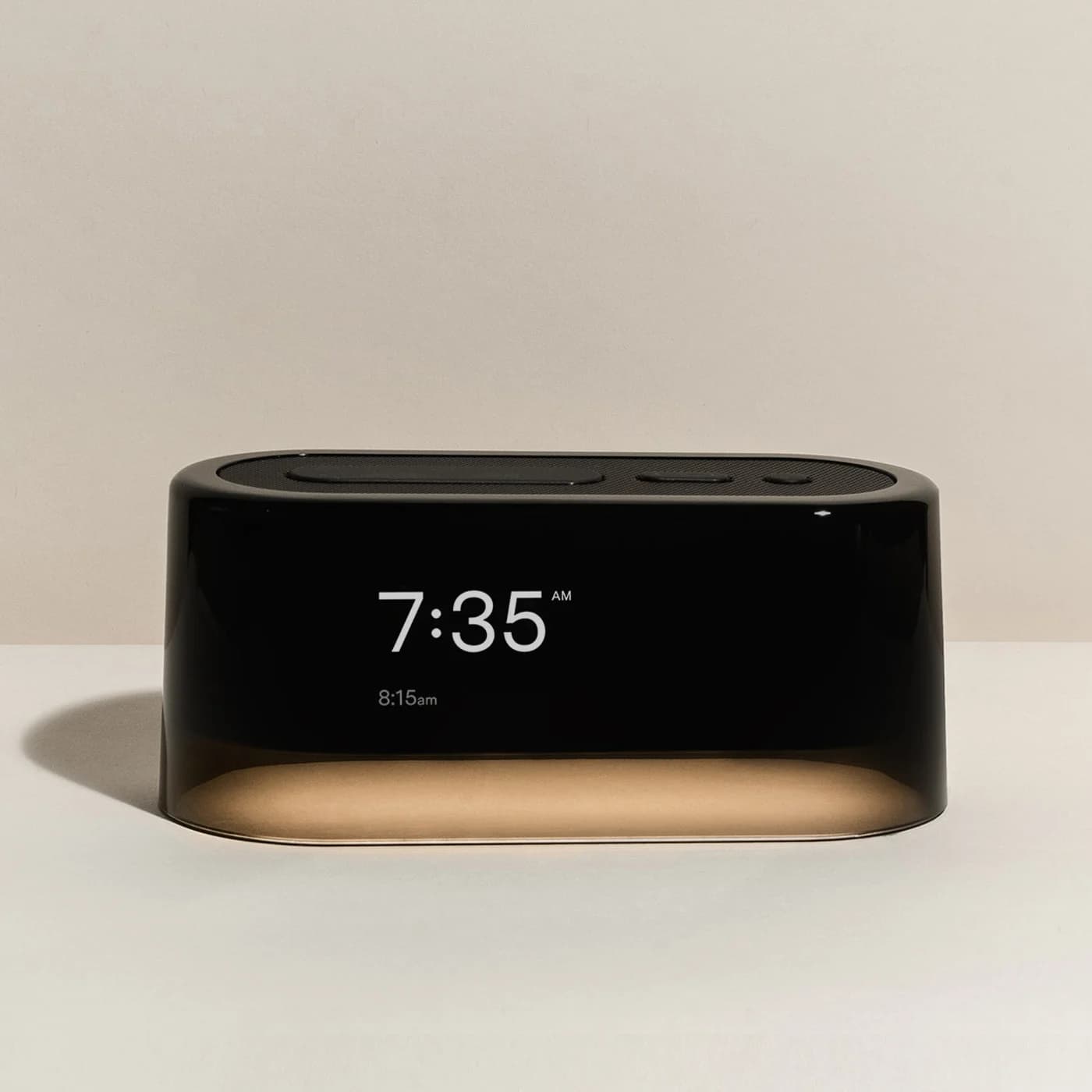
Choose for: Best for offline bedside use
Check before buying: No sunrise light: pair it with a wake-up light if you want one
- 2
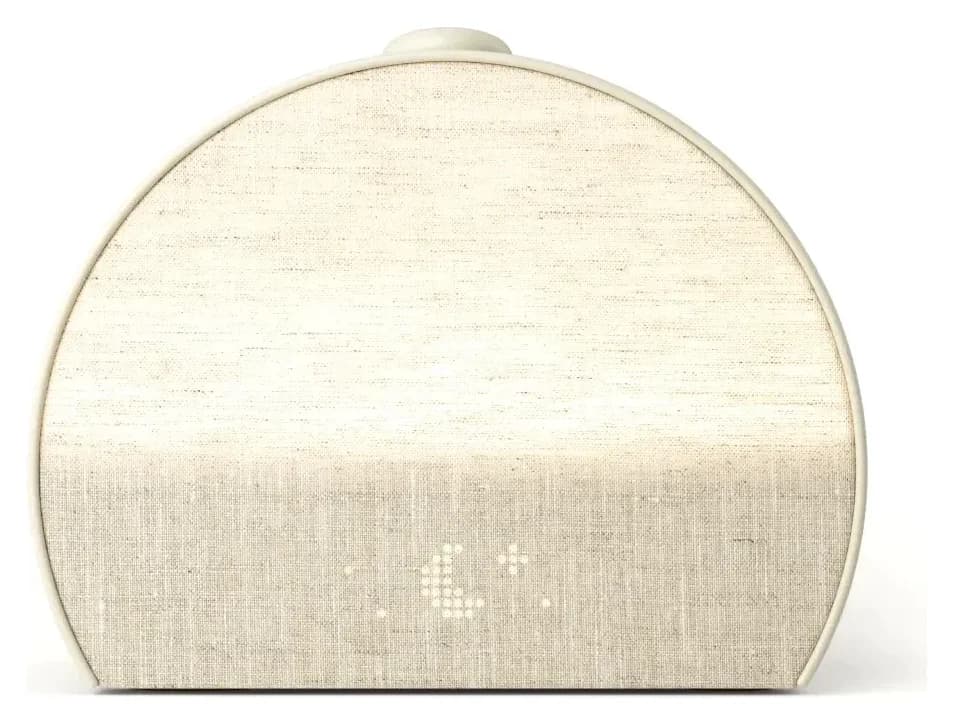
Choose for: Best for a built-in sunrise
Check before buying: Support requires a Hatch+ setup trial despite the product FAQ calling activation optional; cancel before renewal to avoid a charge. Basic use remains after cancellation.
About this guide
thisHUSH covers comfort, quiet and air-quality gear, not health. Nothing on this site is medical advice: for sleep, breathing or hearing concerns, talk to a doctor.
Choose Hatch Restore 3 if you want sunrise light and sound in one bedside device. Choose Loftie Clock if you prefer a two-phase audible alarm, included sounds without a subscription and a documented offline mode. Loftie's built-in nightlight is not a sunrise lamp; the Loftie Lamp is separate. (Loftie, Hatch)
Manufacturer specifications and subscription wording checked November 2, 2026.
Quick picks
- Pick Hatch for sunrise: its light brightens before the alarm sound; a separate light is unnecessary for that feature.
- Pick Loftie for disconnected use: finish setup, download content and enable Offline Mode for use without ongoing Wi-Fi.
- For setup without a smartphone: neither is our recommendation. Both require an app and a 2.4 GHz network initially.
Comparison table: what can you actually do at the bedside?
Wake with gradually brightening light
- Loftie Clock
- No sunrise; nightlight can come on with an alarm
- Hatch Restore 3
- Built-in sunrise before the alarm sound
Create or change an alarm
- Loftie Clock
- Clock buttons
- Hatch Restore 3
- Hatch Sleep app
Start and stop a routine or sound
- Loftie Clock
- Alarms and sounds work from the clock
- Hatch Restore 3
- Big Button starts or advances a routine; hold to stop
Adjust volume
- Loftie Clock
- Clock controls; alarm volume is separate from sound volume
- Hatch Restore 3
- Rotate the Big Button
Snooze or stop an alarm
- Loftie Clock
- Oval button snoozes; small round Select button stops
- Hatch Restore 3
- Press Big Button to snooze; hold to stop
Turn on a bedside light
- Loftie Clock
- Nightlight controlled on the clock
- Hatch Restore 3
- Side light button
Hide the clock display
- Loftie Clock
- Hold snooze for blackout, including the nightlight
- Hatch Restore 3
- App offers Always Off and Off at Night; optional tap to see time
Operate without ongoing Wi-Fi
- Loftie Clock
- Explicit Offline Mode after setup and updates
- Hatch Restore 3
- Wi-Fi required; full offline operation not established by the checked Restore 3 documentation
Keep core audio without a paid membership
- Loftie Clock
- Included audio; no subscription
- Hatch Restore 3
- Included sounds remain; Hatch+ adds premium content
Rely on power-cut operation
- Loftie Clock
- Backup battery; maker's runtime figures differ, below
- Hatch Restore 3
- No Restore 3 outage runtime established in the checked specifications
Full comparison table
Swipe to compare. Row labels stay visible.
| Task | Loftie Clock | Hatch Restore 3 |
|---|---|---|
| Wake with gradually brightening light | No sunrise; nightlight can come on with an alarm | Built-in sunrise before the alarm sound |
| Create or change an alarm | Clock buttons | Hatch Sleep app |
| Start and stop a routine or sound | Alarms and sounds work from the clock | Big Button starts or advances a routine; hold to stop |
| Adjust volume | Clock controls; alarm volume is separate from sound volume | Rotate the Big Button |
| Snooze or stop an alarm | Oval button snoozes; small round Select button stops | Press Big Button to snooze; hold to stop |
| Turn on a bedside light | Nightlight controlled on the clock | Side light button |
| Hide the clock display | Hold snooze for blackout, including the nightlight | App offers Always Off and Off at Night; optional tap to see time |
| Operate without ongoing Wi-Fi | Explicit Offline Mode after setup and updates | Wi-Fi required; full offline operation not established by the checked Restore 3 documentation |
| Keep core audio without a paid membership | Included audio; no subscription | Included sounds remain; Hatch+ adds premium content |
| Rely on power-cut operation | Backup battery; maker's runtime figures differ, below | No Restore 3 outage runtime established in the checked specifications |
Scroll horizontally to see every column
| Task | Loftie Clock | Hatch Restore 3 |
|---|---|---|
| Wake with gradually brightening light | No sunrise; nightlight can come on with an alarm | Built-in sunrise before the alarm sound |
| Create or change an alarm | Clock buttons | Hatch Sleep app |
| Start and stop a routine or sound | Alarms and sounds work from the clock | Big Button starts or advances a routine; hold to stop |
| Adjust volume | Clock controls; alarm volume is separate from sound volume | Rotate the Big Button |
| Snooze or stop an alarm | Oval button snoozes; small round Select button stops | Press Big Button to snooze; hold to stop |
| Turn on a bedside light | Nightlight controlled on the clock | Side light button |
| Hide the clock display | Hold snooze for blackout, including the nightlight | App offers Always Off and Off at Night; optional tap to see time |
| Operate without ongoing Wi-Fi | Explicit Offline Mode after setup and updates | Wi-Fi required; full offline operation not established by the checked Restore 3 documentation |
| Keep core audio without a paid membership | Included audio; no subscription | Included sounds remain; Hatch+ adds premium content |
| Rely on power-cut operation | Backup battery; maker's runtime figures differ, below | No Restore 3 outage runtime established in the checked specifications |
Table sources: Loftie support, Restore 3 controls, alarm guide and display settings. The offline and subscription limits are explained below.
Best for offline bedside use: Loftie Clock
Loftie
A bedside alarm clock with a two-phase alarm, 100+ built-in sounds, a night light and a backup battery, with no subscription or sunrise light.
Check package and model options
- Adjustable night light (can switch on with the alarm); not a sunrise lamp
Loftie's defining feature is its two-phase alarm. Support describes a first tone lasting 30 to 40 seconds, followed by automatic snoozing and a stronger get-up alarm 9 minutes later by default. The snooze interval can be 0, 3, 6 or 9 minutes. Tap the large oval button to snooze; use the small round Select button to dismiss the alarm. (Alarm instructions)
It is our better fit when you want to change an alarm without retrieving your phone. Loftie specifically lists alarms, sounds, nightlight, sleep timer and blackout as functions available from its buttons. It also says the alarm tone and alarm volume apply to every alarm on the clock. For a shared bedroom, do not assume you can give each person's alarm its own volume. (Clock controls)
The included library has 100+ sounds, with nature tracks, white and brown noise among them. Loftie says there is no subscription or paywall. Choose it for that included library and local controls, rather than expecting its nightlight to brighten through a simulated dawn. (Clock features)
There is an app-control conflict worth knowing before purchase. The product FAQ says all app features are accessible on the clock; the more specific support page says Red Mode, Bed Signal and routines use the app. We use the support page's narrower list when judging independence from the phone. (Product FAQ, support)
Best for a built-in sunrise: Hatch Restore 3
Hatch
A bedside sunrise alarm, light and sound machine with app setup and conflicting trial guidance: support requires activation, the product FAQ calls it optional, and basic use remains after cancellation.
Check package and model options
- Sunrise alarm (red to orange to white light) plus a bedside light
Restore 3 combines the light and audible alarm. Its alarm guide describes light gradually brightening over your chosen duration, then sound playing at the alarm time. You create alarms in the Hatch Sleep app and select days, brightness, duration and volume there; light or sound can also be toggled off. (Restore 3 alarm guide)
After setup, the physical controls cover recurring actions well. Press the Big Button to start an evening routine or move to its next step, hold it to stop, and rotate it for volume. Separate buttons pause audio, swap between configured Unwind routines and switch the bedside light on or off. The side alarm toggle disables or enables all alarms; red showing means disabled. (Controls guide)
That makes Hatch our pick for a sunrise routine you configure once and repeat. Loftie is our pick if changing tomorrow's alarm on the device matters more. For a fuller Hatch walkthrough, see our Restore 3 features guide; for other light-based choices, use our sunrise alarm clock guide.
Buying guide: setup, offline use and subscriptions
Initial setup is different from daily use
Loftie needs its app and 2.4 GHz Wi-Fi for setup; internet is also needed for updates and new content. Once updated and showing the correct time, enable Settings → Offline Mode. Hatch requires the free Hatch Sleep app for registration and routine customization, and its Restore 3 specifications require 2.4 GHz Wi-Fi. Neither is a suitable gift for someone who refuses app-based setup. (Loftie setup, Hatch setup requirements)
For Loftie, download the sounds you want before disconnecting. Its support page says a “!” next to a track means it is still downloading. If a combined-band router prevents setup, Loftie suggests separating the bands or using a hotspot set to 2.4 GHz. (Setup and download guidance)
For Restore 3, phone-free does not establish Wi-Fi-free. Hatch's model-specific support article explicitly requires Wi-Fi. We could not establish a full offline feature list or guaranteed alarm behavior during a network outage from the fetched Restore 3 materials. We therefore recommend Loftie when ongoing offline use is essential. (Restore 3 Wi-Fi requirement)
- Yes: Loftie: alarms and basic playback from clock buttons after setup
- Yes: Loftie: documented Offline Mode after setup and content downloads
- Partly: Restore 3: bedside controls after app setup, with Wi-Fi required
- No: Restore 3: a full offline feature guarantee was not established
What remains without a subscription?
Loftie: the maker includes its two-phase alarm, sounds, nightlight, Bed Signal and app without a subscription. There is no trial renewal decision for those Clock features. (Included features)
Restore 3: Hatch's included-versus-premium table puts white, pink and brown noise in the included column, alongside nature and ambient sounds. It also lists included sunrise choices, tap-for-time, pause and the bedside light button. Hatch+ expands the audio library; it is not required just to retain these basics. This matters if you want a sunrise alarm and steady noise without ongoing membership. (Included content and features)
The trial wording conflicts. The Restore product FAQ offers activation during setup as an option and advertises a 30-day Hatch+ trial. Its Restore 3 “Is Hatch+ Required?” support article says trial setup is required, while confirming cancellation leaves basic features available. Check the actual setup screen rather than assuming either activation path is universal. (Product FAQ, Restore 3 support)
Hatch's terms say an activated trial becomes a paid monthly or annual subscription unless cancelled before it ends. Manage app-store purchases through the corresponding app store; Hatch-direct subscriptions through the Hatch account. If you only want the included features, record the renewal date and cancel through the channel that manages your subscription. (Trial and cancellation terms)
Darkness and power cuts are separate questions
Loftie's blackout mode switches off both display and nightlight; hold snooze to engage it and press another button to bring them back. Hatch's app offers Always Off and Off at Night display settings, plus optional tap-to-see-time. Turning off the clock display is a separate setting from choosing the light in a Hatch routine. (Loftie blackout, Hatch display guide, Hatch alarm light settings)
Loftie is designed to stay plugged in. Its support page rates backup at about 5 hours, while the product FAQ says around 5–7 hours and its feature list says five. Those are conflicting manufacturer claims, not a runtime we verified. Hatch's checked Restore 3 specifications give no outage runtime; we do not transfer battery information from other Hatch models to it. For an essential departure, arrange an independent alarm rather than relying on an undocumented outage scenario. (Loftie support, Loftie product page, Hatch specifications)
Box contents, variants and who should receive one
The Clock comes with a wall plug and USB-C cable; the separate Loftie Lamp is not implied by “Loftie Clock.” Restore 3's listed box contains the device, power cord and quick-start guide. Check a bundle's contents explicitly before buying. (Loftie, Hatch)
Our linked records cover the Black Loftie Clock and single Putty Restore 3. Loftie's Red Shell has a red base nightlight; Red Mode changes the display and does not turn other models' nightlights red. Hatch's current selector offers Putty, Greige and Cocoa: check both the generation and finish rather than buying on color alone. (Loftie finishes, nightlight distinction, Restore 3 selector)
For your own bedside: choose Hatch for sunrise and Loftie for offline controls. For guests: we favor Loftie after host setup because alarms can be changed on the clock. For a gift: check the recipient's willingness to install an app before choosing either; with Hatch, explain the trial decision too.
Complete setup at its destination
Confirm the recipient can use the required app and Wi-Fi.
Choose the everyday sounds and alarm
Download Loftie content before using Offline Mode; configure Hatch routines in its app.
Leave a short control card
Show snooze, stop and light controls; for Hatch, explain the alarm toggle and trial renewal.
How we choose
This comparison is based on manufacturer product pages and model-specific support documentation, not physical product testing. We prioritize the task you need to perform: create an alarm, start sound, hide the display, disconnect Wi-Fi or manage a subscription. We name conflicting official claims and leave undocumented outage behavior unresolved. Audio preference and real-world light output are outside what these documents establish. See How we choose for our research policy.
Verdict
Hatch Restore 3 is our sunrise pick: light and sound share one device, with useful physical controls after setup. Loftie Clock is our offline pick: audible two-phase alarms, included sounds without a subscription and documented Offline Mode. Choose by that difference first; if you choose Loftie and also want sunrise light, account for a separate Lamp.
Sources
Official product and support sources were fetched and checked November 2, 2026: Loftie Clock, Loftie support, Hatch Restore 3, Restore 3 controls, alarm guide, display guide, included content, Restore 3 FAQs and subscription terms.
Frequently asked questions
Is the Loftie Clock a sunrise alarm like Hatch Restore 3?
No. Loftie says the Clock is not a sunrise alarm, although its nightlight can turn on with an alarm. The Loftie Lamp is a separate product for a light-based wake-up. Restore 3 combines a sunrise light and sound alarm in the same unit, so it is our pick when sunrise light is the reason for buying.
Can I use Loftie or Hatch Restore 3 without Wi-Fi?
Loftie documents Offline Mode after setup and updates; it needs the app and 2.4 GHz Wi-Fi initially. Its support page says alarms, sounds, nightlight, sleep timer and blackout work from the clock. Hatch explicitly requires Wi-Fi for Restore 3. Phone-free bedside controls do not establish full offline operation, so choose Loftie if routinely disconnecting Wi-Fi is a requirement.
Do Loftie Clock and Hatch Restore 3 need a subscription?
Loftie says all Clock features and its included audio need no subscription. Restore 3 retains core features without ongoing Hatch+ membership, including noise sounds and sunrise options. Hatch advertises a 30-day trial; its pages disagree on whether activation is optional during setup. An activated trial becomes paid unless cancelled, so check the renewal screen before accepting it.
Which clock is better for a guest room?
We would choose Loftie after the host completes setup: alarms and basic playback can be controlled on the clock, and it has a documented offline mode. Restore 3 suits a host-managed sunrise routine, but creating an alarm uses the app. Leave written snooze and stop instructions with either clock, and arrange an independent alarm for any essential departure.
Loftie Clock
AmazonRelated guides
Buying guide · Sunrise Alarm Clocks
Hatch Black Friday Buying Guide: Restore 3, Baby and Older Rest Models
Choose the right Hatch for Black Friday: Restore 3 or Baby, older Rest and Rest+ differences, included features, subscription terms and gift-return checks.
Comparison · Sunrise Alarm Clocks
Philips HF3520 vs Lumie Bodyclock Shine 300: Which to Buy?
Compare Philips HF3520 and Lumie Shine 300 wake-up lights on weekly alarms, sunrise timing, display blackout, snooze and power cuts. Choose the right US model.
Best picks · Sunrise Alarm Clocks
Best Smart Alarm Clocks for Bedside: Apps, Voice and Offline Alarms
Choose a bedside smart alarm clock by its controls, phone setup, subscriptions and outage behavior, with clear Loftie, Hatch Restore 3 and Echo Spot guidance.